IPM Network Access Setup
Step-by-step guide to connect via SSH or VPN.
-
1
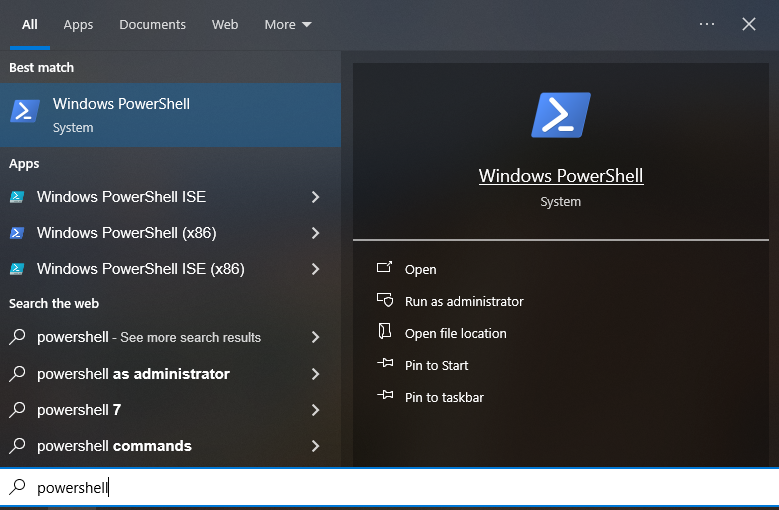
Open PowerShell as Administrator — right-click the Start menu and choose Windows PowerShell (Admin).
-
2
Install the OpenSSH Server feature. This may take a few minutes:Add-WindowsCapability -Online -Name OpenSSH.Server~~~~0.0.1.0
-
3
Start the SSH service and configure it to launch automatically on boot:Start-Service sshd Set-Service -Name sshd -StartupType Automatic
-
4
Allow incoming SSH connections through the Windows Firewall:New-NetFirewallRule -Name sshd -DisplayName 'OpenSSH Server (sshd)' -Enabled True -Direction Inbound -Protocol TCP -Action Allow -LocalPort 22
-
5
Find the machine's IP address — you will need it in the next steps:ipconfigLook for the IPv4 Address listed under your active network adapter and write it down.
-
6
Find the machine's username — you will also need this later:whoami
-
1
Install OpenSSH:sudo apt update && sudo apt install ssh
-
2
Start the SSH service and enable it on boot:sudo systemctl enable --now sshd
-
3
Find the machine's IP address:hostname -I
-
4
Find the machine's username:whoami
-
1
Open PowerShell as Administrator — right-click the Start menu and choose Windows PowerShell (Admin).
-
2
Install the OpenSSH Server feature:Add-WindowsCapability -Online -Name OpenSSH.Server~~~~0.0.1.0
-
3
Start the SSH service and configure it to launch automatically on boot:Start-Service sshd Set-Service -Name sshd -StartupType Automatic
-
4
Allow incoming SSH connections through the Windows Firewall:New-NetFirewallRule -Name sshd -DisplayName 'OpenSSH Server (sshd)' -Enabled True -Direction Inbound -Protocol TCP -Action Allow -LocalPort 22
-
5
Find the machine's IP address:ipconfigLook for the IPv4 Address listed under your active network adapter and write it down.
-
6
Find the machine's username:whoami
-
1
Install OpenSSH:sudo apt update && sudo apt install ssh
-
2
Start the SSH service and enable it on boot:sudo systemctl enable --now sshd
-
3
Find the machine's IP address:hostname -I
-
4
Find the machine's username:whoami
Every concept used in the setup guide is explained here — starting from the basics. Tap any topic to expand it.
Every device connected to a network has an IP address — a number that uniquely identifies it on that network, like a postal address for computers. A typical IP address looks like 192.168.1.45.
A port is a numbered door on a device. A single computer can run many programs at once, each listening on a different port number. When you connect to something, you connect to an IP address and a port. For example, websites are usually on port 80 (plain) or 443 (secure), and SSH is on port 22 by default.
When you see localhost:1337 in the guide, it means "this device" (localhost) at port 1337 — a door that SSH opens on your own computer for the tunnel.
SSH (Secure Shell) is a way to control a remote computer over a network, as if you were sitting in front of it. Everything traveling between your device and the remote machine is encrypted — nobody intercepting the connection can read what's being sent.
In this setup SSH does two things at once: it logs you into the IPM machine, and it also creates an encrypted tunnel through which all your other apps' traffic can travel.
A proxy is a middleman. Instead of your app connecting directly to a website, it sends the request to the proxy, which forwards it on your behalf. A SOCKS proxy is a general-purpose proxy that works with any kind of traffic — web, messaging, email, anything.
When SSH starts with -D 1337, it opens a SOCKS proxy on your device at port 1337. Any app you point at localhost:1337 will have its traffic carried through the SSH tunnel to the IPM network, and appear to come from there.
The -D 1337 flag tells SSH to open a dynamic port forward on your local machine at port 1337. "Dynamic" means it can forward to any destination — not just one fixed address.
This is different from a static forward like -L 8080:someserver:80, which only reaches one specific server. The dynamic forward acts as a full SOCKS proxy that routes wherever the app wants to go, but sends all traffic through the SSH tunnel.
The number 1337 is just an arbitrary choice — any unused port above 1024 would work. It must match whatever you enter in Proxifier, your browser, or your system proxy settings.
The IPM workstation sits on a private network and has no direct internet address. The cluster gateway is a publicly reachable server that acts as a stepping stone into that private network.
The -J flag (ProxyJump) tells SSH to first connect to the gateway, then use that encrypted connection to hop to the IPM machine. This all happens in one command — SSH handles both hops automatically.
VPN users skip this because the VPN already places them inside the private network, so the IPM machine is directly reachable.
A VPN (Virtual Private Network) creates an encrypted tunnel between your device and a remote network. Once connected, your device behaves as if it is physically inside the IPM office — it gets an internal IP address and can reach machines that aren't accessible from the internet.
The VPN gets you into the network. But to route all your apps' traffic through the IPM machine's internet connection (so websites see IPM's IP), you still open an SSH tunnel with -D 1337 to create the SOCKS proxy — without the -J jump, since you're already inside.
These are two different methods for building the VPN tunnel. They differ in how they wrap and encrypt your traffic:
L2TP over IPSec — built into Windows and macOS natively. Uses a shared secret (the word vpn in this setup) as a machine-level password alongside your username and password.
SSTP — sends VPN traffic wrapped inside HTTPS (port 443), which makes it look like normal web traffic. Very firewall-friendly and Windows-native.
You don't need to understand the internals — use whichever one you were given credentials for. Both result in being inside the IPM network.
A CA (Certificate Authority) is a trusted body that vouches for the identity of servers. The IPM VPN server proves its identity with a certificate signed by IPM's own internal CA — an authority your phone has never heard of.
Installing the CA certificate teaches your phone to trust that authority. Without it, the phone refuses the connection because it cannot verify the server is genuine.
Most apps don't know how to speak to a SOCKS proxy — they just open connections directly. Proxifier intercepts all outgoing connections from every app on your system and quietly reroutes them through the SOCKS proxy that SSH opened on port 1337.
This means you don't have to configure Chrome, Telegram, Outlook, or any other app individually — Proxifier handles all of them at once.
Important: Proxifier must be fully closed before you run the SSH command, and only launched after the tunnel is established. If Proxifier is open first, it tries to send the SSH connection itself through the (not yet running) proxy, causing a loop.
Android has no built-in SSH client, so ConnectBot fills that role. It connects to remote machines over SSH and can also create port forwards — including the dynamic SOCKS forward that replaces -D 1337 in a terminal command.
In the cluster path, you set up two hosts in ConnectBot (the gateway and the IPM machine) and create port forwards on each. In the VPN path, ConnectBot connects directly to the IPM machine after OpenSSTP Client establishes the VPN.
SocksTun is the Android equivalent of Proxifier — it routes apps through the SOCKS proxy that ConnectBot creates. Android does not allow a single app to intercept all system traffic, so SocksTun lets you choose which specific apps to route through the tunnel.
Android's built-in VPN support doesn't include SSTP. OpenSSTP Client adds SSTP support, allowing your Android phone to connect to the IPM VPN server the same way a Windows PC would.
Once connected, you are inside the IPM network, and ConnectBot can then SSH directly to the IPM machine without a jump host.
Your ISP: Sees an encrypted SSH or VPN connection. Cannot see what's inside, which sites you visit, or what data you send.
Public Wi-Fi: Sees the same — an encrypted connection to a known server.
IPM network administrators: Can see your traffic after it exits the IPM machine, the same way as any office network admin.
Websites you visit: See the IPM machine's IP address, not your personal IP.
None of these tools are "cloud" services — they are local software that you configure to connect to IPM's servers directly. No third-party company sits in the middle of your connection.
- ConnectBot — open source, stores only connection settings. Does not transmit data to its developers.
- SocksTun — routes selected apps through the proxy. Does not log or transmit your traffic.
- OpenSSTP Client — connects you to the VPN. The connection is between your device and IPM's server only.
- Proxifier — a commercial Windows tool. Routes traffic locally. Does not send your traffic to Proxifier's servers.
Websites see the IPM machine's IP. Your ISP sees only an encrypted SSH connection to the cluster gateway.
The VPN replaces the jump host. Everything else works exactly the same way.